Are You Innovative? Think Twice About That Keyword

I live in a world dripping with keywords and phrases.

Actually, we all do. Think the billboard you drive by every morning isn’t precisely written? That Google search you just performed isn’t engineered within an inch of its life?

Everyone knows that advertising and marketing has been turned on its ear in little more than a decade.

Bye bye subscription rates, content is king.

Findability and click-through rates (CTR) long ago hijacked the quest for eyeballs.

The same has become true for résumés, particularly résumés that are first taken for a spin through a company’s applicant tracking system (ATS) before ever being seen by a human being.

Without the right mix of keywords, the résumé may never be seen by anyone.

And don’t forget LinkedIn. Without carefully chosen keywords and phrases, you risk being missed in a sea of 150 million users.

But in my practice, I regularly see confusion around keywords.

For example, I regularly ask my clients for the top 8-12 keywords and phrases they think we should build copy around. We use job descriptions to help make the decision, and we revisit the notion throughout the engagement. Clarity comes with revision after revision.

Oddly, no matter the client’s background — no matter his or her skill or seniority — they inevitably come back with first-round words like this:

  • innovative
  • leader
  • experienced
  • seasoned

(The funny thing about using the word “innovative” is that its use is anything but … but that’s a topic for another blog post!) Continue reading

How Many Passwords Are Enough? A Real Life Horror Story

Even before our collective blood pressure shot through the roof this week over LinkedIn’s password breach, I’d been thinking about creating a unique username and password for each online account I own.

Well, this week forced me over the edge, and I took two hours furiously doing just that: dreaming up and inputting a unique password for every … online … account … I … own.

In the words of a client who responded after I sent an alert through my e-newsletter: “A different login for every account? H. E. double hockey sticks!” (I couldn’t have loved her response more if she’d ended it with “Batman.”)

By the way, LinkedIn’s Vicente Silveira published Taking Steps to Protect Our Members on the professional network’s blog. Don’t miss it.

Are Your Passwords Unique?

So a question I’ve been mulling, “How many passwords are enough?” obviously hit home this week.

Here’s what I’ve wanted to share with my friends and clients, but have left sitting in a drawer until now.

A real life horror story, or at least I think so.

“They took control of my email account. Then they eliminated my address book, severing my connection to friends, family, colleagues, and everyone else from as far back as 1997!”

Can you imagine the feeling?

Gutted.

Unable to really do much of anything meaningful to mitigate damage that you’ll never really know the full extent about?

I was as passive as the next guy when it came to password management until my virtual assistant recently shared a horror story from one of her connections.

A tale with far-reaching implications, and we should all be aware.

Here’s what went down. Continue reading

How to Customize Your LinkedIn URL

This blog post was updated on 12/6/12 to reflect changes to LinkedIn’s interface.

Thinking about tightening up your LinkedIn presence?

There are many ways to do that, but perhaps the easiest is snagging your custom public profile URL.

Customizing your public profile URL is great when you want to put it on your business card or résumé. Or anywhere else you want to publicly drive people to find out more about you online. Plus it’s easier to remember!

Confused?

If your public profile URL isn’t customized, it will appear as a confusing mess, ending in a stream of random numbers and letters, like this:

  • linkedin.com/pub/12kdud9ekhgkdla93s

Ugly, right? (The “pub” part stands for “public.”)

Good news: Continue reading

How to Write a Great LinkedIn Recommendation

How to write a great LinkedIn recommendationEver been asked to write a LinkedIn recommendation for a friend or colleague?

It’s flattering, right? Until you realize how much work it can involve. How many questions it elicits when you finally sit down to write “what should be simple.”

As with all writing, developing a strategy before going in is an essential start. For this article I’ve lifted directly from my own LinkedIn profile.

Start With Who They Are

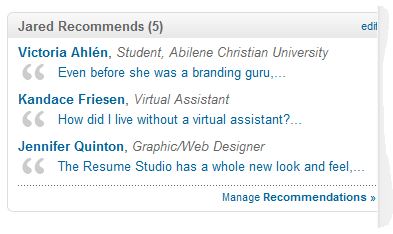
In the screenshot below, you’ll notice that I’ve recommended five people to date. Three show up as teaser lines, prompting you to click for more.

Writing LinkedIn recommendations

From My Own LinkedIn Profile

So what do you notice about the copy? Each leads with what the subject brings to the world, professionally.

Victoria Ekegren Ahlén (CEO of social media agency Awoque) and I went to school together. I’ve since admired her work from afar, but since we went to school together, I can’t speak directly about her work today.

However, I remember Victoria from college as a smart woman who cares deeply about things that matter, she is also a person of immense integrity. Her international perspective helped me see beyond my own backyard all those years ago.

So it took time to develop a strategy for Victoria’s recommendation, but I finally led with “even before she was a branding guru,” which gets who she is out the gate fast. By framing it this way, I acknowledged her now, in a way that lets me speak authentically about Victoria as I know her.

You’ll notice the same approach when I wrote recommendations for my virtual assistant, Kandace Friesen of Friesen Virtual Assistants and my graphic / web designer, Jennifer Quinton of Quinton Design Studio. In each example, the reader knows who the subject is without having to click for more. And perhaps it breathes a bit of life into the reader experience. Professional writing shouldn’t mean stale writing.

Be Honest

There are two ideas under the honesty category.

Continue reading

How to Hide a Contact’s Activity on Your LinkedIn Newsfeed

Did you know you can hide a contact’s activity on your LinkedIn newsfeed?

I didn’t either, until I had the privilege of meeting with some LinkedIn folks a few weeks ago.

Sure, you want to stay connected with your contacts, right? But some connections like to tweet a lot.

With those tweets linked to their LinkedIn newsfeeds, it can all become too much.

For those who tweet irregularly, no problem, right. A hashtag here and there.

For prolific tweeters, however; whether they realize it or not, they take up a lot of my LinkedIn newsfeed reading time. And it’s often about things I’m not so interested in. (I love the Oscars, but imagine a contact “live tweeting” the Oscars, and pushing those tweets onto your LinkedIn feed. Notsomuch.)

The problem is, you still want to stay connected.

The solution? THE HIDE BUTTON.

Here’s how:  Continue reading