4 Reasons You Need a Career-Only Email Address

These four realities make a great case for creating a career development only email address 

Reality #1:  

You can’t assume that you’ll always be in control of your work email address. 

Harvard attorney Shauna Bryce of BryceLegal.com and HowToGetALegalJob.com says it’s natural to feel like we’ll always be in control of our work email addresses until we relinquish them.

But it’s not always true. Continue reading

Missed the Memo? Don’t Put Negative Stuff in Writing

Recently, a friend — let’s call her Sue — wrote a pretty funny Facebook rant. Don't Share Negative News

Witty marketing is her gig, after all, and she’s smart-as-a-whip, so we all enjoy reading her creative take on life.

Unfortunately, the post involved blasting a sponsor, and she then proceeded to copy and paste the would-be sponsor’s rejection letter on her Facebook wall.

Yes, on her wall.

I inboxed her right away and suggested that she remove it ASAP.

While perhaps humorous behind closed doors — yes, there’s probably a time and a place to blow off steam — social media has become a bull pen of possible career-blunting blunders. For some, “trying not to step in it” has become a full-time affair.

If you’re prone to what my mother used to call, “popping off at the mouth,” consider the possible implications of my friend’s post: Continue reading

How to Hide Your LinkedIn Contacts From the General Public

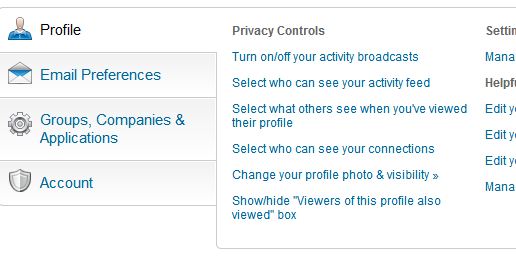
Select #4 under “Privacy Controls”

Did you know you can hide your LinkedIn connections? 

“But why,” you say? “Why hide the connections I’ve so diligently tended?”

For professionals whose connections basically represent their client list, it may be smart to keep that list within your control.

Here’s how:

  1. Login to your Linked profile
  2. Hover over your name in the upper right corner
  3. Click “Settings”
  4. Click “Select who can see your connections” under “Privacy Controls” (in the “Profile” tab near the bottom of the page, fourth on the list in the picture I’ve uploaded with this post)
  5. Choose “Only You” in the drop down menu

While you’re there, check out all the other behind-the-scenes controls LinkedIn offers.

Related post: How to Hide a Contact’s Activity on Your LinkedIn Newsfeed

A word of caution: I’ve been told that your connections will still see your mutual connections, but I’ve not been able to clear this up. Also, LinkedIn will still display your contact count.

Only you will know if it’s best to hide your list of contacts, but knowing you have the option gives a lot more control over your professional Rolodex.

Until next time!

Jared Redick
Visit: The Resume Studio.com
Follow: @TheResumeStudio
Connect: LinkedIn.com/in/jaredredick
Call: 415-397-6640

How Many Passwords Are Enough? A Real Life Horror Story

Even before our collective blood pressure shot through the roof this week over LinkedIn’s password breach, I’d been thinking about creating a unique username and password for each online account I own.

Well, this week forced me over the edge, and I took two hours furiously doing just that: dreaming up and inputting a unique password for every … online … account … I … own.

In the words of a client who responded after I sent an alert through my e-newsletter: “A different login for every account? H. E. double hockey sticks!” (I couldn’t have loved her response more if she’d ended it with “Batman.”)

By the way, LinkedIn’s Vicente Silveira published Taking Steps to Protect Our Members on the professional network’s blog. Don’t miss it.

Are Your Passwords Unique?

So a question I’ve been mulling, “How many passwords are enough?” obviously hit home this week.

Here’s what I’ve wanted to share with my friends and clients, but have left sitting in a drawer until now.

A real life horror story, or at least I think so.

“They took control of my email account. Then they eliminated my address book, severing my connection to friends, family, colleagues, and everyone else from as far back as 1997!”

Can you imagine the feeling?

Gutted.

Unable to really do much of anything meaningful to mitigate damage that you’ll never really know the full extent about?

I was as passive as the next guy when it came to password management until my virtual assistant recently shared a horror story from one of her connections.

A tale with far-reaching implications, and we should all be aware.

Here’s what went down. Continue reading

Google Alerts Job Search Blooper?

Over Christmas dinner 2011, a friend asked my advice about the best way to jumpstart her job search in the New Year.  

I listed networking as my absolute number one recommendation.

I also mentioned my aversion to posting one’s résumé online for reasons including potential identity theft.

At the same moment, her husband closed his phone and said, “Interesting you say that. I was just alerted that a colleague is looking for a new job.”

“Really? How?” We all asked.

Troy, who leads marketing and PR for his company, said: “The Google Alert set for our firm just pointed me to a colleague’s résumé, which she apparently uploaded to Monster.com.”

Everybody at the table stopped eating, agape. Forks mid-air. Continue reading