4 Reasons You Need a Career-Only Email Address

These four realities make a great case for creating a career development only email address 

Reality #1:  

You can’t assume that you’ll always be in control of your work email address. 

Harvard attorney Shauna Bryce of BryceLegal.com and HowToGetALegalJob.com says it’s natural to feel like we’ll always be in control of our work email addresses until we relinquish them.

But it’s not always true. Continue reading

Age: Should You Mask It?

Ever considered downplaying your age during a job search? 

Yes, it’s illegal to make discriminatory hiring decisions based on age, but if I had a nickel for every time a client asked what I thought about the topic, the notion must be alive and well, if only unseen.

Libraries, bookstores, and online articles are jam-packed with career development articles dedicated to euphemizing, masking, or spinning a person’s seniority to postpone the discovery of age.

But stop the presses a minute.

Instead of masking your age, have you considered taking an active role in capitalizing on your experience for everything it represents?

So what to do? Continue reading

Missed the Memo? Don’t Put Negative Stuff in Writing

Recently, a friend — let’s call her Sue — wrote a pretty funny Facebook rant. Don't Share Negative News

Witty marketing is her gig, after all, and she’s smart-as-a-whip, so we all enjoy reading her creative take on life.

Unfortunately, the post involved blasting a sponsor, and she then proceeded to copy and paste the would-be sponsor’s rejection letter on her Facebook wall.

Yes, on her wall.

I inboxed her right away and suggested that she remove it ASAP.

While perhaps humorous behind closed doors — yes, there’s probably a time and a place to blow off steam — social media has become a bull pen of possible career-blunting blunders. For some, “trying not to step in it” has become a full-time affair.

If you’re prone to what my mother used to call, “popping off at the mouth,” consider the possible implications of my friend’s post: Continue reading

How to Hide Your LinkedIn Contacts From the General Public

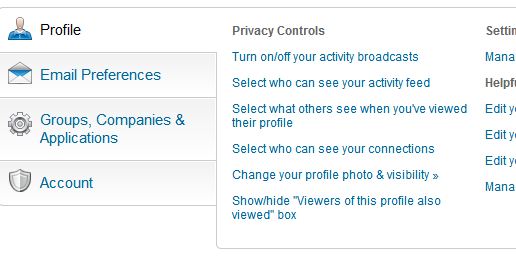
Select #4 under “Privacy Controls”

Did you know you can hide your LinkedIn connections? 

“But why,” you say? “Why hide the connections I’ve so diligently tended?”

For professionals whose connections basically represent their client list, it may be smart to keep that list within your control.

Here’s how:

  1. Login to your Linked profile
  2. Hover over your name in the upper right corner
  3. Click “Settings”
  4. Click “Select who can see your connections” under “Privacy Controls” (in the “Profile” tab near the bottom of the page, fourth on the list in the picture I’ve uploaded with this post)
  5. Choose “Only You” in the drop down menu

While you’re there, check out all the other behind-the-scenes controls LinkedIn offers.

Related post: How to Hide a Contact’s Activity on Your LinkedIn Newsfeed

A word of caution: I’ve been told that your connections will still see your mutual connections, but I’ve not been able to clear this up. Also, LinkedIn will still display your contact count.

Only you will know if it’s best to hide your list of contacts, but knowing you have the option gives a lot more control over your professional Rolodex.

Until next time!

Jared Redick
Visit: The Resume Studio.com
Follow: @TheResumeStudio
Connect: LinkedIn.com/in/jaredredick
Call: 415-397-6640

Are You Innovative? Think Twice About That Keyword

I live in a world dripping with keywords and phrases.

Actually, we all do. Think the billboard you drive by every morning isn’t precisely written? That Google search you just performed isn’t engineered within an inch of its life?

Everyone knows that advertising and marketing has been turned on its ear in little more than a decade.

Bye bye subscription rates, content is king.

Findability and click-through rates (CTR) long ago hijacked the quest for eyeballs.

The same has become true for résumés, particularly résumés that are first taken for a spin through a company’s applicant tracking system (ATS) before ever being seen by a human being.

Without the right mix of keywords, the résumé may never be seen by anyone.

And don’t forget LinkedIn. Without carefully chosen keywords and phrases, you risk being missed in a sea of 150 million users.

But in my practice, I regularly see confusion around keywords.

For example, I regularly ask my clients for the top 8-12 keywords and phrases they think we should build copy around. We use job descriptions to help make the decision, and we revisit the notion throughout the engagement. Clarity comes with revision after revision.

Oddly, no matter the client’s background — no matter his or her skill or seniority — they inevitably come back with first-round words like this:

  • innovative
  • leader
  • experienced
  • seasoned

(The funny thing about using the word “innovative” is that its use is anything but … but that’s a topic for another blog post!) Continue reading