I Love Ya LinkedIn, But Something’s Amiss

Either recruiters have gotten lazy, or there’s a new LinkedIn function in use that doesn’t quite hit the mark.

Thursday, I received an email from a recruiter that in ordinary circumstances would be accompanied by at least a slightly customized note.

Instead, I was left to guess why I was sent an unsolicited job description calling for a healthcare industry tech writer.

Um. Hmm.

First, I had to deduce what it was.

Second, I wasn’t the right target.

I suspect that the content and skills I have on my profile somehow ranked in a set of parameters that brought me to the recruiter’s attention.

Good.

While I’m not looking to abandon my executive résumé writing practice, it’s nice being considered. Continue reading

Writing for LinkedIn? Get to the Point!

How to write LinkedIn profileLast week, I read the opening line to an executive’s LinkedIn profile.

She showed up among the list of people I may know.

I didn’t know her, but it appears she’s at the top of her game, so sure, I’d like to.

Unfortunately, she’s not writing concisely: a quest each of us is always on, presumably.

Her LinkedIn profile began: “In my current position as the head of XYZ at ABC company….”

Hmm.

Why current?  Isn’t that assumed?

Let’s strike and flip a few words, shall we?

In my current position as the head of XYZ at ABC company….”

Here’s her alternative:

“As head of ABC’s XYZ practice, I….”

Instead of slogging through twelve words, she nails it with seven. Bonus points for driving straight to the point.

A beautiful thing.

Of course, some will argue that the sentence structure is all too passive, but I believe there’s a time and place to back into an idea. This is one of them. We know who she is right away.

I say this as loudly to myself as to anyone. As a writer, I’m on a constant quest for economy of words.

This is one way to find that efficient balance.

Try it.

Until next time!

Jared Redick

Visit: The Resume Studio.com
Follow: @TheResumeStudio
Connect: LinkedIn.com/in/jaredredick
Call: 415-397-6640

4 Reasons You Need a Career-Only Email Address

These four realities make a great case for creating a career development only email address 

Reality #1:  

You can’t assume that you’ll always be in control of your work email address. 

Harvard attorney Shauna Bryce of BryceLegal.com and HowToGetALegalJob.com says it’s natural to feel like we’ll always be in control of our work email addresses until we relinquish them.

But it’s not always true. Continue reading

Missed the Memo? Don’t Put Negative Stuff in Writing

Recently, a friend — let’s call her Sue — wrote a pretty funny Facebook rant. Don't Share Negative News

Witty marketing is her gig, after all, and she’s smart-as-a-whip, so we all enjoy reading her creative take on life.

Unfortunately, the post involved blasting a sponsor, and she then proceeded to copy and paste the would-be sponsor’s rejection letter on her Facebook wall.

Yes, on her wall.

I inboxed her right away and suggested that she remove it ASAP.

While perhaps humorous behind closed doors — yes, there’s probably a time and a place to blow off steam — social media has become a bull pen of possible career-blunting blunders. For some, “trying not to step in it” has become a full-time affair.

If you’re prone to what my mother used to call, “popping off at the mouth,” consider the possible implications of my friend’s post: Continue reading

How to Hide Your LinkedIn Contacts From the General Public

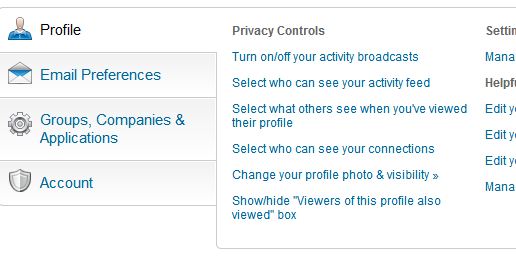
Select #4 under “Privacy Controls”

Did you know you can hide your LinkedIn connections? 

“But why,” you say? “Why hide the connections I’ve so diligently tended?”

For professionals whose connections basically represent their client list, it may be smart to keep that list within your control.

Here’s how:

  1. Login to your Linked profile
  2. Hover over your name in the upper right corner
  3. Click “Settings”
  4. Click “Select who can see your connections” under “Privacy Controls” (in the “Profile” tab near the bottom of the page, fourth on the list in the picture I’ve uploaded with this post)
  5. Choose “Only You” in the drop down menu

While you’re there, check out all the other behind-the-scenes controls LinkedIn offers.

Related post: How to Hide a Contact’s Activity on Your LinkedIn Newsfeed

A word of caution: I’ve been told that your connections will still see your mutual connections, but I’ve not been able to clear this up. Also, LinkedIn will still display your contact count.

Only you will know if it’s best to hide your list of contacts, but knowing you have the option gives a lot more control over your professional Rolodex.

Until next time!

Jared Redick
Visit: The Resume Studio.com
Follow: @TheResumeStudio
Connect: LinkedIn.com/in/jaredredick
Call: 415-397-6640